

“Your website is live.”
That sentence should scare you a little, because “live” only means your website is online. It doesn’t mean anyone can find it.
Mine went live on a Thursday at 4:13 in the morning. I clicked through every page, everything worked, and I genuinely thought I was done.
Three days later, on a Sunday evening, I typed my own name into Google. My LinkedIn came up. My Facebook page came up. My website, the one thing I built to bring customers in, was nowhere.
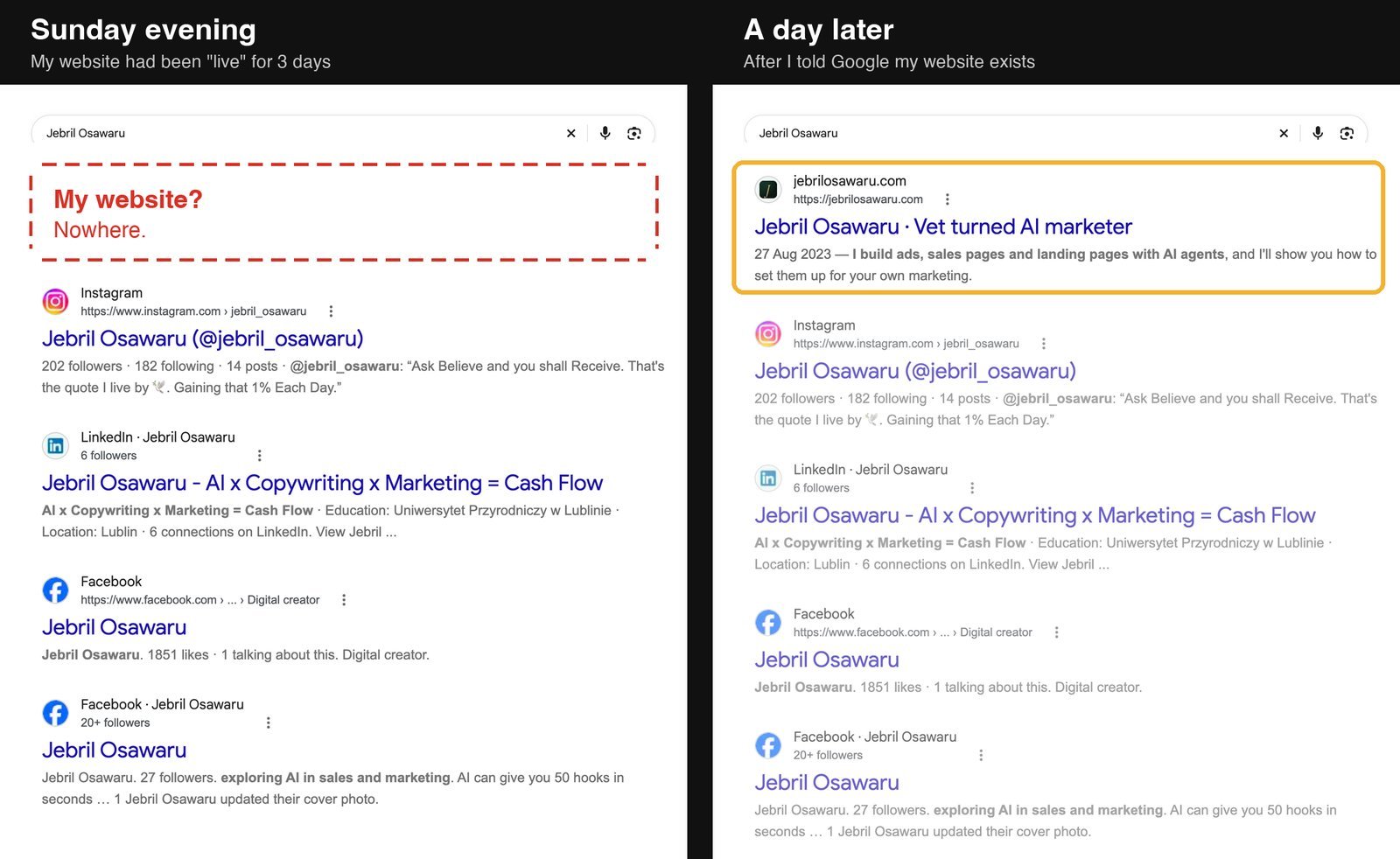
So for three days, anyone who looked me up found two profiles and no website. Did anyone look? I have no idea, and that’s the scary part, because nobody messages you to say “I couldn’t find your website.” They just buy from someone they can find.
If you just typed your own name or business into Google and got the same nothing, here’s the good news: your website most likely isn’t broken, and you don’t need to pay anyone to fix it. People make SEO sound like rocket science, with keywords and backlinks and someone charging you every month, but getting your website onto Google in the first place is free, and it took me less than 60 minutes.
The short answer is right below. Under it, I’ll show you how to tell in ten seconds which problem you have, the seven reasons a new website stays off Google, with where to look for each one, and the exact steps I took that Sunday.
That’s the usual reason for a new website, and it was mine. But “not showing up” can mean Google doesn’t have your website at all, or that it has it and isn’t showing it to you, so before you change anything, find out which one you have.
First, check whether Google knows your website at all
Open Google and type site: with your web address straight after it, no space and no https. Like this: site:yourbusiness.com
- Nothing comes up? Google hasn’t added a single page of your website yet. Your answer is in reasons 1 to 5 below.
- Your pages come up, but you still can’t find yourself when you search your name or what you sell? Good news: you’re on Google. Your problem is reason 6.
- Some pages come up, but not the one you want? Go to reason 7.
And watch out for one trap. If your website only appears when you type the whole address into Google, .com and all, that doesn’t count. Typing the address just opens your website, which isn’t the same as Google finding you, because your customers don’t know your address. They type your name, or what you sell.
The 7 reasons a new website doesn’t show up on Google
1Google hasn’t found your website yet
This is the big one for new websites, and it was mine.
Google gets around the internet by following links, moving from the websites it already knows to the websites they point to. A brand-new website has almost no links pointing to it, so there’s no road in. Mine had been live for three days, and Google still hadn’t found it.
Damn, I messed up there.
I thought “live” was the finish line, so telling Google never even crossed my mind.
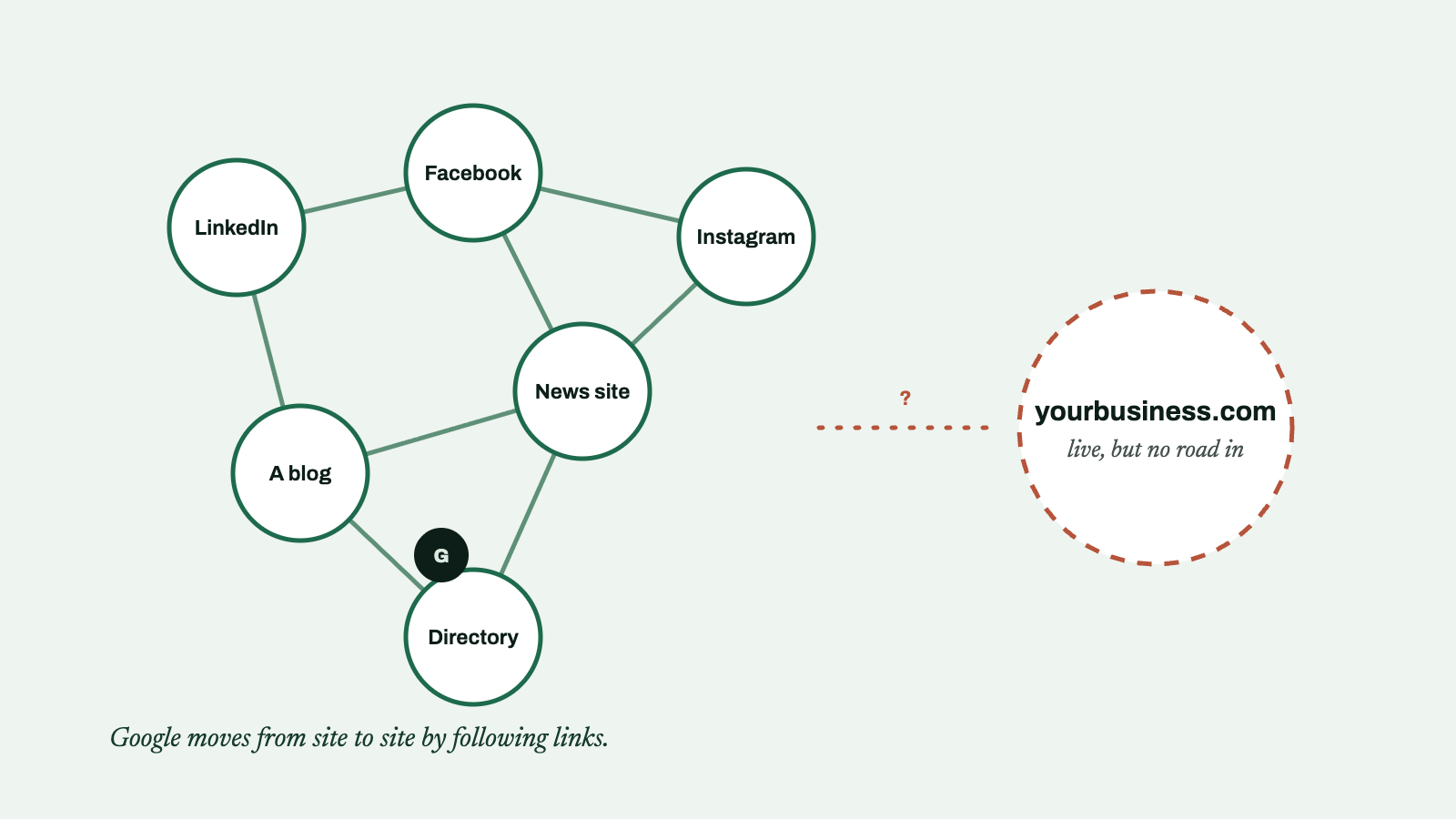
The fix: you don’t have to wait for Google to find a road in. Tell it yourself, with Google Search Console, Google’s free tool for website owners. You add your website, prove it’s yours, submit your sitemap (the list of every page on your website), and request indexing, which means asking Google to come and look. My exact steps are further down, right after the seven reasons, and the free guide at the end of this article shows every click, with a picture of each screen.
2It’s simply too new
Even after you tell Google, it doesn’t add you on the spot. Google says it can take anywhere from a few days to a few weeks, and in website forums, people usually say about two weeks.
Mine was quicker than that. I told Google on Sunday night, and about a day later my website was the first result when I searched my name. But that’s one website, so if yours takes the full two weeks, nothing has gone wrong.
The reports inside Search Console are even slower than Google itself. Mine still said “Processing data” on Tuesday afternoon, when my website had already been the first result for my name since early that morning.
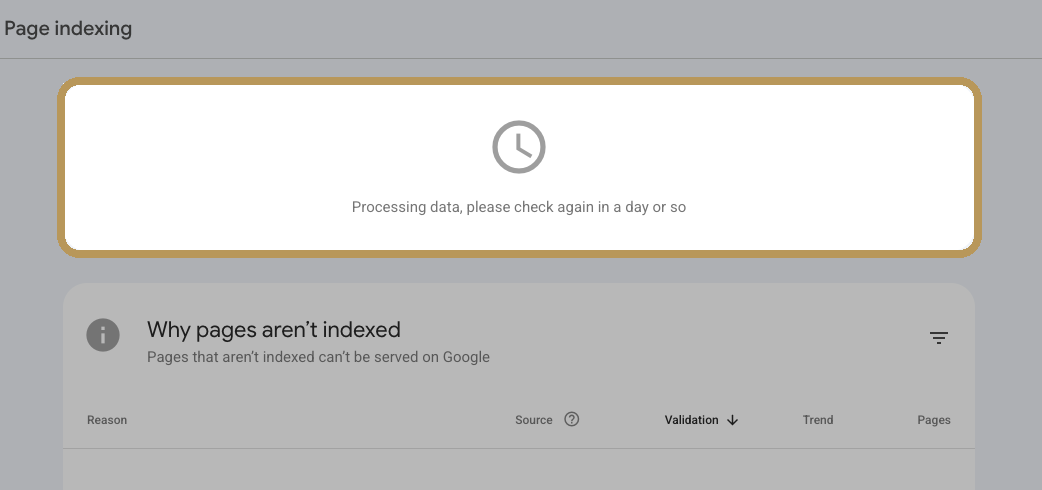
So instead of waiting on the report, check for yourself with the site: search from the top of this article.
3Your website is telling Google to stay away
This one is sneaky, because waiting won’t fix it. Most website builders have a switch that hides your website from Google while it’s being built, and it’s easy to forget to switch it off at launch, whether you built the website yourself or paid someone to do it. From the outside, your website looks completely normal, so you can wait weeks for Google while your own website is telling it to stay away.
When someone asked r/SEO why their website wasn’t showing up on Google, this is what a reply found:
17 of your pages have no-index turned on… Right now Google won’t crawl those 17 pages.
Seventeen pages, each one hidden by a single switch. Here’s where that switch lives on each website builder:
| Your website runs on | Where to look |
|---|---|
| WordPress | Settings → Reading → Search engine visibility. The box “Discourage search engines from indexing this site” must be empty. |
| WordPress + Yoast or Rank Math | Open the page in the editor and check its SEO settings. It must not be set to noindex. |
| Shopify | Online Store → Preferences. If your store still has a password, Google can’t see it. Remove the password when you launch. |
| Wix | Your SEO settings. “Let search engines index your site” must be on. |
| Squarespace | Settings → Site availability. It must be Public, not Private or Password-protected. |
4A file on your website is blocking Google
That switch isn’t the only thing that can shut Google out. Every website can have a small file called robots.txt, which tells search engines where they’re allowed to go, and sometimes it tells them to go nowhere.
Check yours by opening yourbusiness.com/robots.txt in your browser. If you see these two lines, the file is telling every search engine to stay out of your whole website, every page you built:
yourbusiness.com/robots.txtUser-agent: *
Disallow: /
Not sure what you’re looking at? Search Console checks it for you: in its URL Inspection tool, a page this file is blocking says “Blocked by robots.txt”.
5Nothing on the internet points to your website
Once nothing is blocking Google, it still needs a way in. Remember the road from reason 1? Telling Google is the quick fix, but links are still how Google finds you by itself, and how people find you too, so start building roads of your own.
On its own, that won’t push you to the top of Google. But every place your link lives is another road to your door, for Google and for people. Someone who taps the link in your Instagram bio didn’t need Google to find you at all.
6You’re on Google, just not where you’re looking
This one is for you if the site: search did show your pages, because being on Google and being near the top of Google are two different things. When one person on Reddit asked why their website wasn’t on Google, the most popular reply was simply: “Do you maybe mean that it’s not showing up high in the results? Because that takes a lot of time and effort.”
Getting listed takes less than 60 minutes. Showing up when a stranger searches “best [what you sell] in [your city]” takes pages that answer what your customers search for, posted week after week.
7Google knows about your page and hasn’t added it yet
And sometimes Google knows about a page and still hasn’t added it. Search Console shows you when that happens: open Pages in the left menu, and it lists the pages Google skipped, and why.
On a new website, this is usually just time. But if the page is thin, like a heading and two lines, add what a customer would come to that page for, like what you offer, who it’s for and how to reach you, then request indexing once.
How I fixed mine in less than 60 minutes
Mine was reason 1, and this is exactly how I fixed it. It was a quiet Sunday evening, I was relaxing, and the whole thing took less than 60 minutes before I went back to relaxing. Claude did the technical part in about 2 minutes, but you don’t need Claude for any of this, because every step is a few clicks.
- Add your website to Google Search Console. Pick URL prefix and type your full address, with the https.
- Copy your proof. Choose HTML tag and copy the line of code Google gives you. It looks scary, but it’s just your name tag.
- Paste it into your website. On WordPress with Rank Math, it goes in Rank Math SEO → General Settings → Webmaster Tools, in the Google Search Console box. With Yoast, it’s Yoast SEO → Settings → Site connections. Shopify, Wix and Squarespace each have their own spot, and the guide shows each one.
- Clear your cache. On WordPress, hover over your cache plugin in the black bar at the top of your dashboard (LiteSpeed, WP Rocket or W3 Total Cache) and click Purge All. If you skip this, Google sees the old copy of your page, the one without your code, and can’t find your proof. Shopify, Wix and Squarespace do it for you.
- Click Verify. You want to see “Ownership verified”. Google also sends you a welcome email. Mine landed at 1:19 in the morning.
- Submit your sitemap. Click Sitemaps in the left menu and type
sitemap_index.xmlif you use Rank Math or Yoast,wp-sitemap.xmlon WordPress without them, orsitemap.xmlon Shopify, Wix and Squarespace. - Request indexing for your homepage and your 2 or 3 most important pages, like your shop or your booking page, once each.
- Get on Bing too. It takes 2 minutes, because Bing copies your proof and your sitemap from Search Console. This is the ChatGPT step (more on that below).
- Add your Instagram, TikTok, X and YouTube to Search Console, so you can see how your posts show up on Google. Google is still rolling this out, so you might not see it yet.
Check yours now
How long does it take for a new website to show up on Google?
Once the steps are done, the rest is waiting, and Google’s own answer is anywhere from a few days to a few weeks. Here’s exactly how mine went:
| When | What happened |
|---|---|
| Thursday, 4:13 am | My website goes live. |
| Sunday evening | I Google my name. LinkedIn, Facebook, no website. |
| Sunday night | I tell Google: verify, sitemap, request indexing. Less than 60 minutes. |
| 1:19 am | Google’s welcome email lands. |
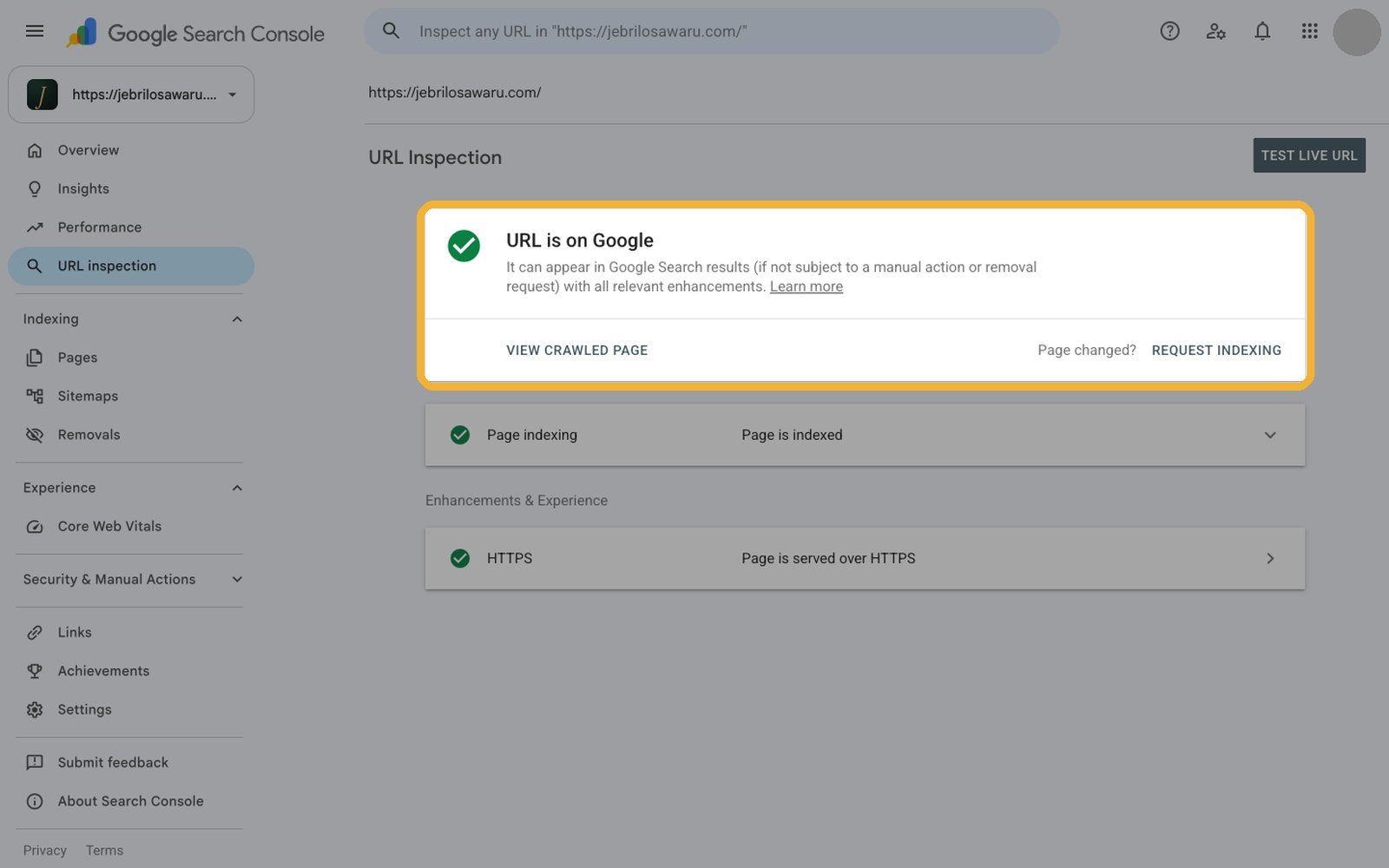
| About a day later | My website is the first result for my name, and Search Console says “URL is on Google”. |
| Tuesday afternoon | The Pages report still says “Processing data”. |
Will ChatGPT find my website?
Google isn’t the only place people look anymore. More and more people skip it and ask ChatGPT things like “which caterer in Lekki is good for a wedding?” And when ChatGPT searches the web, it mostly searches through Bing, so if you’re not on Bing, you’re much less likely to be in its answer.
I almost skipped Bing. I literally asked Claude, “are you certain Bing is supposed to work?” But once you’ve done Google, Bing takes 2 minutes: go to bing.com/webmasters, choose “Import from Google Search Console”, and it copies your proof and your sitemap.
Being on Bing means ChatGPT can find you. Getting it to actually recommend your business when someone asks is a bigger job, and that’s my next article.
Questions people ask
Why can’t I see my website on Google?
Usually because Google hasn’t found it yet. Search site:yourbusiness.com on Google. If nothing comes up, add your website to Google Search Console and submit your sitemap.
How do I get Google to show my website?
Tell Google about it with Search Console: verify that the website is yours, submit your sitemap, and request indexing for your homepage. Then give it a few days to a few weeks.
Does it cost money to get on Google?
No. Google Search Console and Bing Webmaster Tools are both free. Paying Google is for ads, which is a different thing.
How long does it take for a new website to show up on Google?
A few days to a few weeks, according to Google. Mine showed up for my name about a day after I told Google.
I thought “live” was the finish line, and it isn’t. Building a website is the easy part now. Being found is a separate job, and it’s yours.
So go and tell Google you exist. It’ll take you less than 60 minutes. And if there’s someone whose business you’ve tried to Google and couldn’t find, send them this.